Best Way to Manage Multiple Coaching Centers in WordPress
Managing multiple coaching centers in WordPress can become challenging as your education business grows. Student records, branch managers, quizzes, reports, and center-specific access can quickly become difficult to manage without the right system.
If you’re looking for the best way to manage multiple coaching centers in WordPress, this guide will show you how coaching institutes, abacus franchises, tuition centers, and education businesses can efficiently manage multiple branches from a single WordPress website. If you’re just getting started, you may also like our guide on How to Manage Multiple Coaching Centers Without Giving WordPress Admin Access.
Why Managing Multiple Coaching Centers in WordPress Is Difficult
Most education businesses start with a single center. However, as additional branches are added, several operational challenges arise:
Student data gets mixed between centers.
Branch managers need limited access.
Reports become difficult to organize. You can also explore How to Track Student Performance Across Multiple Branches to build a better reporting workflow.
Quiz and exam management becomes complicated.
Owners struggle to monitor multiple locations.
Administrative workload increases significantly.
Without a proper coaching center management system, scaling your organization becomes increasingly difficult. Learn how to organize student records efficiently in our guide on How to Manage Students Across Multiple Branches in WordPress.
Essential Features for Managing Multiple Coaching Centers in WordPress
Before choosing a solution, make sure it includes the following features.
1. Center-Wise Management
A proper center-wise management system should allow each branch to operate independently while remaining connected to the main organization.
Benefits include:
Better organization
Improved data accuracy
Easier administration
Simplified expansion
2. Branch Manager Access
Branch managers should be able to manage only their own center.
This helps:
Protect sensitive information
Reduce administrative mistakes
Improve accountability
3. Student Management
A reliable WordPress coaching center management solution should allow managers to:
Add students
Edit student information
View center-specific records
Track student performance
Manage enrollments
without accessing the WordPress admin dashboard.
4. Quiz and Exam Management
For coaching institutes and education franchises, online exams are essential.
A complete solution should provide:
Center-wise quiz management
Student performance tracking
Branch-specific reporting
Organized exam administration
5. Frontend Dashboards
Many branch managers are not comfortable using WordPress admin panels.
Frontend dashboards provide:
Simpler workflows
Better user experience
Faster operations
Reduced training requirements
A frontend dashboard also lets you Give Branch Managers Access Without WordPress Admin Rights, improving both security and usability.
Best Way to Manage Multiple Coaching Centers in WordPress
One of the most effective ways to manage multiple coaching centers in WordPress is by using a center-wise management solution integrated with your existing quiz platform.
Solution for Quiz And Survey Master (QSM) Users
If your organization uses Quiz And Survey Master (QSM), MTLS Centerwise for QSM helps you: If you’re planning a complete multi-branch setup, read our Manage Multiple Branches in QSM guide.
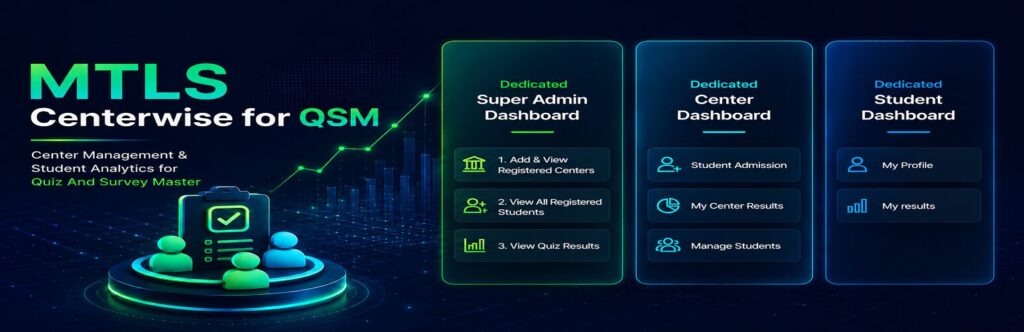
Create multiple centers
Assign center managers
Manage students center-wise
Track center-specific reports
Restrict access based on center permissions
Provide frontend management capabilities
This allows coaching institutes and franchise owners to manage multiple branches from a single WordPress installation.
Solution for Quiz Maker Users
If your organization uses Quiz Maker, MTLS Centerwise for Quiz Maker provides similar functionality. Learn the complete setup process in our How to Manage Multiple Branches in Quiz Maker guide.
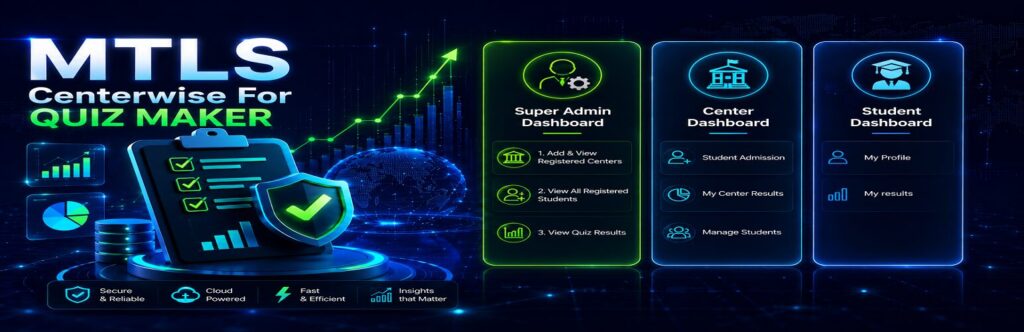
With this solution, you can:
Create and manage multiple centers
Assign students to specific branches
Give branch managers controlled access
Monitor center-wise performance
Organize student records efficiently
Manage operations through frontend dashboards
This makes it easier to manage multiple branches without maintaining separate websites.
Benefits of Managing Multiple Coaching Centers in WordPress
Improved Organization
Each center remains structured and easy to manage.
Better Security
Managers can access only the information related to their own branch.
Easier Expansion
New centers can be added without rebuilding your system.
Centralized Monitoring
Owners can monitor all branches from a single dashboard.
Better Student Tracking
Performance data remains organized by center, making reporting easier and more accurate.
Lower Operating Costs
Managing multiple centers from a single WordPress website reduces software and maintenance costs.
Who Can Benefit From a Multi-Center WordPress Management System?
This solution is ideal for:
Coaching Institutes
Abacus Franchises
Tuition Centers
Training Institutes
Education Franchises
Online Learning Networks
Skill Development Centers
If your organization operates more than one branch, a centralized management system can significantly improve efficiency.
Frequently Asked Questions
How can I manage multiple coaching centers in WordPress?
You can manage multiple coaching centers in WordPress using a center-wise management system that allows separate branch management, student tracking, and reporting from a single website.
What is the best WordPress solution for education franchises?
The best solution depends on your quiz platform. Organizations using QSM can use MTLS Centerwise for QSM, while Quiz Maker users can use MTLS Centerwise for Quiz Maker.
Can branch managers access only their own center?
Yes. A center-wise management system can restrict branch managers so they only see and manage data related to their assigned center.
Can I manage multiple branches from a single WordPress website?
Yes. Modern multi-center management solutions allow multiple branches to operate independently while remaining connected to one central WordPress installation.
Is this suitable for abacus franchises and coaching institutes?
Absolutely. Abacus franchises, tuition centers, coaching institutes, and education franchises can all benefit from centralized branch management.
Still comparing quiz plugins? Read our Quiz Maker vs QSM: Which Is Better for Coaching Institutes? comparison before making your decision.
Final Thoughts
As your organization grows, it becomes increasingly important to manage multiple coaching centers in WordPress efficiently. Without a proper system, handling students, branch managers, quizzes, reports, and center-specific permissions can become overwhelming.
Whether you use Quiz And Survey Master (QSM) or Quiz Maker, implementing a center-wise management solution can help you streamline operations, improve reporting, and scale your education business more effectively.
By choosing the right coaching center management system, education franchises and coaching institutes can manage multiple branches from a single WordPress website while maintaining organization, security, and operational efficiency.