How to Manage Multiple Branches in Quiz Maker (The Ultimate Guide)
Managing multiple branches in Quiz Maker can quickly become a massive administrative challenge as your education business scales. Whether you run an abacus franchise, a competitive coaching institute, a tuition center, or a corporate training organization, handling students, branch managers, and exam reports across multiple physical locations can drain your time without the right system in place. If you’re comparing the two most popular WordPress quiz plugins, read our Quiz Maker vs QSM: Which Is Better for Coaching Institutes? guide before choosing a solution.
In this comprehensive guide, you will learn exactly how to manage multiple branches in Quiz Maker efficiently, keep your center data perfectly organized, and simplify your daily operations using a centralized WordPress setup.
Why Managing Multiple Branches in Quiz Maker Is Difficult
Most education businesses start with a single center, which is easy to handle. However, as new franchise branches are added, administrators often face several critical bottlenecks:
-
Data Mixing: Student records from different branches get tangled together in the WordPress backend.
-
Access Control Risks: Branch managers require controlled, restricted access to view only their students.
-
Complex Reporting: Filtering reports by specific centers becomes a tedious, manual task.
-
Tracking Issues: Monitoring branch-wise growth and student performance becomes highly complicated.
-
Admin Overload: The central administrative workload increases significantly with every new center.
Without a proper branch management system, scaling your education hub securely becomes nearly impossible.
What Should a Multi-Branch Quiz Maker System Include?
To effectively manage multiple branches in Quiz Maker without risking your website’s security, your system must provide the following core features:
1. Branch-Wise Student Management
Each branch manager should be able to manage their own students independently. The benefits of isolated data include:
-
Better organization and faster enrollment management.
-
Improved accuracy in student tracking.
-
Significantly reduced administrative mistakes.
Learn how to organize student records efficiently in our guide on How to Manage Students Across Multiple Branches in WordPress.
2. Secure Branch Manager Access
Branch managers should have restricted access, allowing them to view and manage only their assigned center. This ensures strict data privacy and controlled daily operations across your franchise.
3. Dedicated Frontend Management Dashboard
Most branch managers are not technical experts and are not comfortable navigating the complex WordPress admin area. A clean frontend dashboard empowers them to:
-
Add new students easily.
-
Manage active enrollments.
-
View specific center reports.
-
Monitor daily branch activity—all without ever touching sensitive website settings.
You may also like our guide on How to Give Branch Managers Limited Access in WordPress for additional security best practices.
4. Branch-Specific Reporting
A professional system must automatically filter reports for individual centers. Tracking localized student performance, quiz results, and branch activity allows business owners to evaluate which franchise location is performing best. Learn more in our detailed guide on Center-Wise Reporting in Quiz Maker.
The Best Way to Manage Multiple Branches in Quiz Maker
One of the most effective and affordable ways to solve this problem is by implementing a center-wise management system.
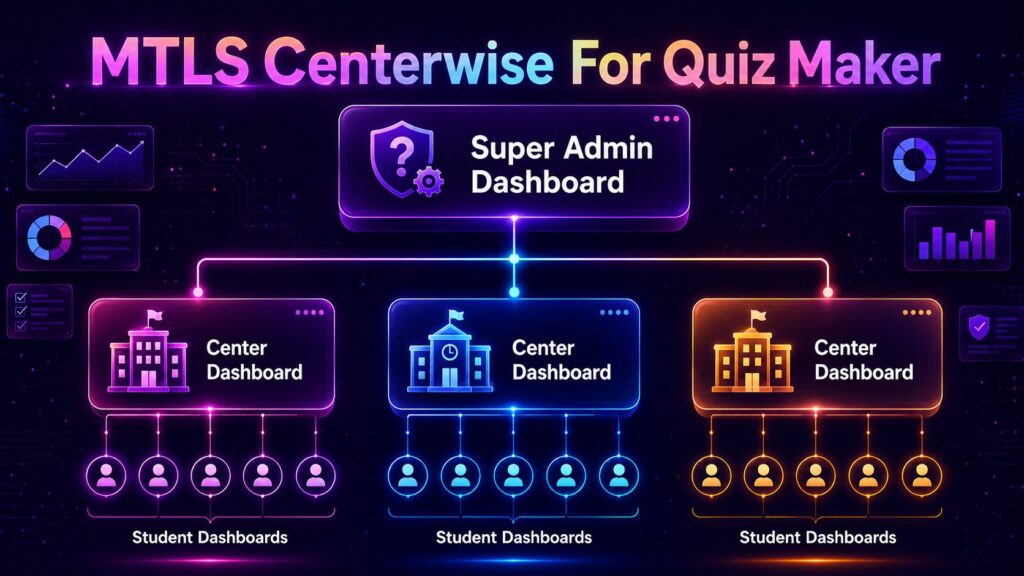
Instead of building and paying for separate WordPress websites for every single branch, a centralized solution allows all your locations to operate from a single WP installation while keeping their data strictly separated.
This smart approach provides easier administration, lower maintenance costs, centralized monitoring for the owner, and infinite scalability.
How MTLS Centerwise for Quiz Maker Helps
MTLS Centerwise for Quiz Maker is a specialized add-on designed specifically for education businesses that operate across multiple physical or virtual branches.
By integrating this tool, you instantly upgrade your platform with enterprise-level features:
Create Unlimited Centers: Add and manage multiple franchise branches directly from a single main dashboard.
Assign Branch Managers: Securely assign managers who can access only their designated center’s data.
Manage Students Center-Wise: Students remain permanently linked to their respective branches, preventing data confusion.
Frontend Student Management: Branch managers can rapidly enroll and manage students from a clean frontend portal without needing WordPress admin access.
Center-Wise Reports: Track quiz performance and activity separately for each location.
Secure Operations: Every center operates in an isolated digital environment while remaining seamlessly connected to your main educational website.
Benefits of a Single-Website Branch System
Choosing a centralized approach to manage multiple branches in Quiz Maker offers incredible advantages for your business growth:
Easier Expansion: New franchise branches can be launched in minutes without setting up new hosting or domains.
Better Data Organization: Student records and test scores remain perfectly associated with the correct center.
Lower Costs: Maintaining one robust website is vastly cheaper than paying for multiple separate installations.
Centralized Control: Franchise owners get a bird’s-eye view of all branches from one master dashboard.
Improved Security: Front-end isolation ensures managers only access information related to their specific center.
Who Should Use a Multi-Branch Quiz Maker System?
This centralized solution is the perfect fit for scaling businesses, including:
Coaching Institutes & Hubs
Abacus Franchises
Tuition Centers
Large Education Franchises
Corporate Training Institutes
Skill Development Centers
Any organization operating across multiple locations can drastically cut down admin time by switching to centralized management.
Frequently Asked Questions (FAQs)
Can Quiz Maker manage multiple branches by default? While Quiz Maker provides excellent core exam functionality, organizations with multiple branches require additional center-wise management capabilities (like MTLS Centerwise) to isolate data properly.
Can branch managers access only their own center? Yes. A proper center-wise management system restricts managers to their assigned branch, ensuring they cannot view data from other franchise locations.
Do I need separate websites for each branch? No. A centralized system allows all branches to operate securely from a single WordPress website while maintaining complete data separation.
Can branch managers enroll students from the frontend? Yes. Frontend dashboards allow non-technical managers to easily register and manage students without ever accessing the WordPress admin backend.
Is this suitable for education franchises? Absolutely. Franchise-based education businesses benefit the most from centralized branch management, secure frontend access, and isolated reporting.
Final Thoughts
As your education business scales, it becomes increasingly critical to manage multiple branches in Quiz Maker efficiently. Without a structured system, handling thousands of students, managers, quizzes, and reports across multiple centers can quickly turn into an operational nightmare.
By implementing a center-wise management solution, coaching institutes and education franchises can streamline their daily operations, ensure data privacy, and scale their organizations effortlessly—without the headache of managing separate websites for every branch.
Take control of your growing education franchise today.
[Link: Download MTLS Centerwise for Quiz Maker- Free Version]
[Link: Download MTLS Centerwise for Quiz Maker- Pro Version]