If you want to build a secure frontend dashboard for Quiz Maker, you already know how critical it is to manage branch data properly. But as your business grows and you open new franchise locations or training centers, a critical challenge emerges: managing the data of multiple branches.
When peak admission seasons arrive, handling thousands of students across different locations using a single, centralized database can lead to massive confusion.
In this guide, we will explore why isolating your exam data is crucial and how you can easily create a secure frontend dashboard for Quiz Maker.
Why Centralized Data is Hurting Your Franchise
By default, Quiz Maker routes all test results, user data, and quiz metrics into one main WordPress backend interface. If you are a solo instructor, this is fine. But if you run a franchise model, this setup creates severe operational bottlenecks.
-
The Privacy Problem: If you have five different branches, you do not want the manager of Branch 1 accessing the leads, student data, and performance metrics of Branch 2.
-
The Security Threat: To let managers view results, you are forced to give them access to the backend of your website. One wrong click in the WordPress dashboard could break your site or delete vital exam data.
-
Scaling Issues: As you add more centers to your network, manually filtering out which student belongs to which center becomes nearly impossible.
Why You Need a Frontend Dashboard for Quiz Maker
The most effective way to protect your website and empower your franchise owners is by implementing a frontend dashboard.
A frontend dashboard takes the complex data from Quiz Maker and presents it in a clean, restricted, and user-friendly interface on the front end of your website.
Total Data Isolation: Managers are locked into their own ecosystem. They only see the data relevant to their specific branch.
Professional Branding: Instead of seeing the standard WordPress logo and admin bar, your partners log into a portal that looks like a custom-built enterprise app.
Focus on Growth: With a streamlined system handling the data, your managers can focus on enrolling students and conducting exams efficiently.
Easily Integrate MTLS Centerwise with Quiz Maker
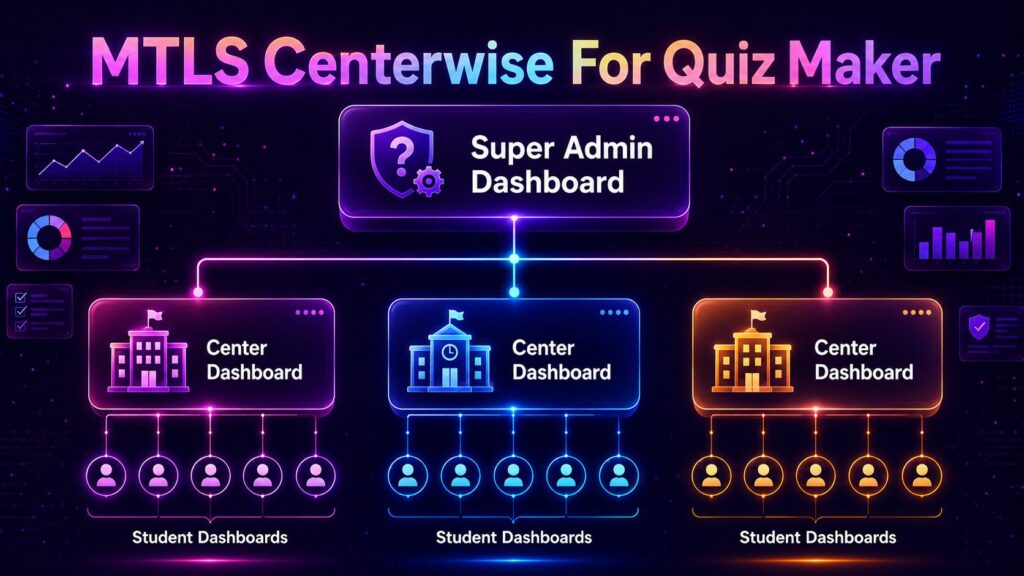
You don’t need a custom coding agency to achieve this. MTLS Centerwise for Quiz Maker is specifically engineered to add multi-branch frontend capabilities to your existing setup.
Here is how it streamlines your workflow:
1. Seamless Setup
Install the MTLS Centerwise add-on alongside your core Quiz Maker plugin. The setup is straightforward and requires zero coding knowledge.
2. Isolate Centers Instantly
Create dedicated centers within the plugin and assign specific managers to them. The plugin acts as a bridge, automatically routing Quiz Maker data to the correct branch.
3. Frontend Result Tracking
When your managers log in, they are greeted with a secure frontend dashboard. They can track the exact number of students at their center, view localized Quiz Maker results, and manage their admissions without ever touching the WordPress backend.
Take Control of Your Education Hub Today
Providing a secure, isolated, and professional experience for your branch managers is no longer optional—it is a necessity for growth. Secure your WordPress backend and give your franchise the toolkit it deserves. Managing multiple training centers during the admission rush doesn’t have to be a headache. By implementing a dedicated frontend dashboard for Quiz Maker today, you provide a smooth, secure, and professional system for your franchise managers. Upgrading to a frontend dashboard for Quiz Maker will save you hours of admin work and protect your WordPress backend from accidental errors. Take full control of your student data and scale your education hub securely now!
[Link: Download MTLS Centerwise for Quiz Maker (Free Version)] [Link: Explore MTLS Centerwise Pro Features]