Manage Multiple Branches in QSM: Ultimate Guide
Managing multiple branches in QSM can become increasingly difficult as your coaching institute, franchise, or education business grows. While Quiz And Survey Master (QSM) is an excellent core platform for creating quizzes and assessments, managing thousands of students, branch managers, and reports across multiple physical locations often requires advanced organization. If you’re still deciding between Quiz Maker and QSM, read our detailed Quiz Maker vs QSM Comparison for Coaching Institutes.
In this comprehensive guide, you’ll learn exactly how to manage multiple branches in QSM efficiently, improve your operational control, and scale your education business using a highly secure, centralized WordPress system.
Why Managing Multiple Branches in QSM Is Challenging
Many education businesses begin with a single successful center. However, as new franchise branches are added, several management bottlenecks quickly appear:
Messy Student Records: Student data from different branches becomes difficult to organize and separate.
Security & Access Issues: Branch managers need limited access, but giving them WordPress admin rights is risky.
Tangled Reports: Assessment reports from different locations get mixed together in the backend.
Complex Tracking: Performance tracking for specific centers becomes a manual, time-consuming process.
Admin Overload: The central administrative workload increases significantly with every new center launched.
Without a structured branch management system, scaling your daily operations becomes difficult and holds back your business growth.
What Should a Multi-Branch QSM System Include?
To successfully manage multiple branches in QSM, a proper setup should provide the following four essential features:
1. Branch-Wise Student Management
Each branch must be able to manage its own students independently. The key benefits include:
Better organization and data isolation.
Improved data accuracy.
Significantly reduced administrative errors.
Faster student enrollment management.
Learn more in our complete guihttps://mtls.tech/manage-students-across-multiple-branches-wordpress/de on How to Manage Students Across Multiple Branches in WordPress.
2. Strict Branch Manager Permissions
Branch managers should have access only to information related to their assigned center. This strict access control helps:
Protect sensitive franchise information.
Improve overall website security.
Prevent accidental changes to your core QSM quizzes.
3. A Clean Frontend Dashboard Access
Many center managers are simply not comfortable using the cluttered WordPress admin dashboard. A secure frontend dashboard allows managers to effortlessly:
Add new students.
Manage active enrollments.
View localized branch information.
Monitor specific reports—without ever accessing backend website settings.
You may also like our guide on How to Give Branch Managers Limited Access in WordPress.
4. Branch-Specific Reporting
A top-tier multi-branch QSM system should automatically filter and provide reports for:
Individual franchise branches.
Local student performance.
Quiz completion rates.
Branch growth trends.
This localized data helps owners make better, data-driven business decisions. Learn how reporting works in detail in our Center-Wise Reporting in QSM guide.
The Best Way to Manage Multiple Branches in QSM
One of the most effective and affordable ways to manage multiple branches in QSM is by using a center-wise management system. If you also manage admissions across different locations, our guide on How to Manage Admissions Across Multiple Coaching Centers explains the complete workflow.
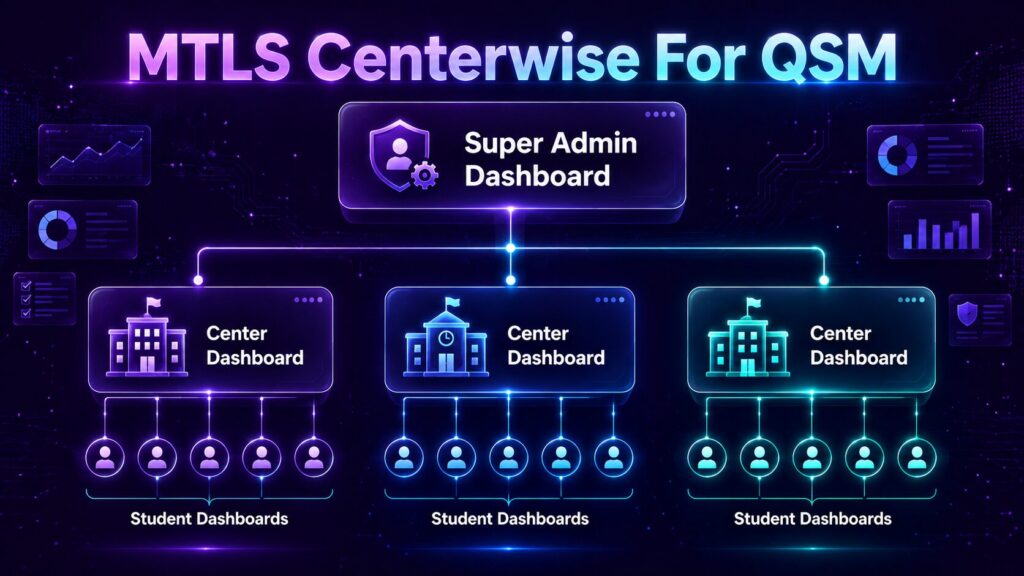
Instead of paying for and maintaining separate hosting and websites for every location, a centralized solution allows all branches to operate securely from a single WordPress installation while keeping their data properly separated.
This approach provides massive advantages:
Easier Administration: Manage everything from one place.
Lower Maintenance Costs: Pay for just one domain and hosting plan.
Better Scalability: Add new centers in just a few clicks.
Centralized Monitoring: Keep an eye on your entire franchise network.
How MTLS Centerwise for QSM Helps
MTLS Centerwise for QSM is a powerful add-on designed specifically for coaching institutes, education franchises, and training organizations that operate across multiple branches.
This plugin seamlessly simplifies branch management while helping you maintain complete control over student data and QSM reports.
Create Multiple Centers: Manage all physical or virtual branches from a single WordPress website.
Assign Center Managers: Securely give branch managers access only to their assigned centers.
Center-Wise Student Management: Keep student records strictly organized and linked to the correct branch.
Frontend Management Dashboard: Allow managers to perform daily operations from a beautiful interface without entering the WordPress admin area.
Branch-Specific Reports: Monitor individual center performance separately for much better analysis.
Secure Data Separation: Each branch operates independently while remaining fully connected to your central platform.
Benefits of Centralized QSM Management
Implementing this solution brings immediate benefits to your daily workflow:
Better Organization: Student and branch data remain perfectly structured.
Easier Expansion: New centers can be added instantly without building additional websites.
Reduced Admin Work: Empower branch managers to handle routine tasks independently.
Improved Reporting: Center-wise reports provide crystal-clear visibility into franchise performance.
Who Should Use a Multi-Branch QSM System?
This scalable solution is an ideal fit for:
Coaching Institutes & Hubs
Abacus Franchises
Tuition Centers
Corporate Training Institutes
Education Franchises
Skill Development Centers
Any organization operating multiple locations can drastically benefit from centralized branch management.
Frequently Asked Questions (FAQs)
Can QSM manage multiple branches by default?
QSM is an excellent core engine for quizzes and assessments. However, organizations with multiple centers require additional branch management capabilities (like MTLS Centerwise) to securely isolate data.
Can branch managers access only their assigned center?
Yes. A center-wise management system restricts managers exclusively to their own branch’s data.
Do I need separate WordPress websites for each center?
No. A centralized multi-branch setup allows all your centers to operate securely from one single website, saving you time and money.
Can branch managers manage students from the frontend?
Yes. Frontend dashboards empower branch managers to manage students and view reports without ever accessing the WordPress backend.
Is this suitable for coaching franchises?
Absolutely. Education franchises benefit the most from centralized branch management, data security, and isolated reporting.
Final Thoughts
As your organization grows, it becomes increasingly critical to manage multiple branches in QSM efficiently. Without a structured system in place, handling students, local managers, reports, and branch operations across multiple locations can quickly become overwhelming.
By implementing a center-wise management solution, coaching institutes and education franchises can simplify their administration, improve reporting accuracy, and scale operations effortlessly.
If your organization uses Quiz And Survey Master (QSM) and operates multiple centers, securing a centralized branch management system is the smartest move you can make for your business growth today.