If you are looking to build a secure frontend dashboard for QSM, you have likely hit a major roadblock when managing multiple branches.Quiz and Survey Master (QSM) is undoubtedly one of the most powerful WordPress plugins for creating exams and assessments. However, if you are running an education franchise, a coaching hub, or a multi-branch institute, you have likely hit a major roadblock: How do you manage multiple centers without mixing up all your student data?
During the peak admission season, managing hundreds of new enrollments across different branches can quickly turn into an administrative nightmare. By default, QSM keeps all results in one central location.
In this guide, we will show you exactly how to create a dedicated frontend dashboard for QSM, allowing you to isolate branch data and secure your exam portal.
The Big Risk: Giving Backend Access to Center Managers
When you have multiple branches, each center manager needs to see the results and enrollments for their specific students. Without a frontend solution, your only option is to give these managers access to your WordPress backend.
This creates three massive risks for your business:
Data Privacy Violations: Managers can see student data and exam results from branches that do not belong to them.
Accidental Deletions: Providing backend access to non-technical staff increases the risk of someone accidentally altering global plugin settings or deleting critical quizzes.
Unprofessional Appearance: Sending your franchise partners to a cluttered WordPress admin panel instead of a branded, clean dashboard hurts your brand’s authority.
If you want to scale your operations without losing control, you need a system that keeps managers on the frontend. This is why creating a frontend dashboard for QSM is the most secure option for your franchise.
The Solution: A Dedicated Frontend Dashboard for QSM
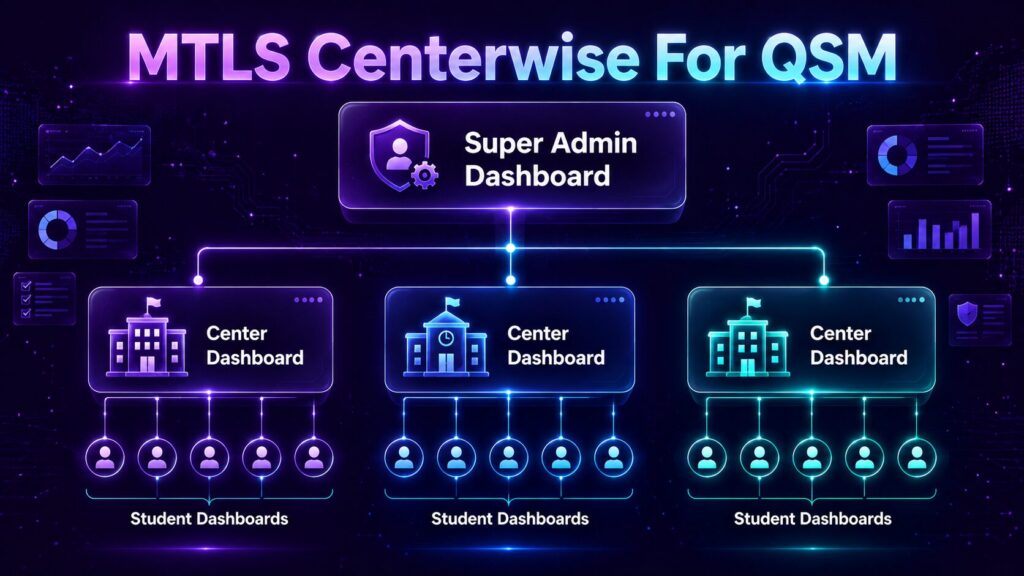
A frontend dashboard completely transforms how your education hub operates. It acts as a secure wall between your WordPress admin area and your center managers.
By implementing a frontend portal, you ensure that:
Branch Isolation: Center Manager A can only see students and results for Branch A.
Zero Backend Access: Managers log in through a clean, branded page on your website, never seeing the WordPress admin panel.
Streamlined Admissions: During high-traffic admission periods, managers can quickly enroll students and track performance without navigating complex menus.
Enter MTLS Centerwise: The Ultimate QSM Add-on
To solve this exact problem, we built MTLS Centerwise for QSM. It is a dedicated add-on designed specifically to bridge the gap between QSM and multi-branch management.
Here is how you can set it up in minutes:
Step 1: Install the Plugin
You don’t need to hire expensive developers to build a custom portal. Simply download and install the MTLS Centerwise plugin directly to your WordPress site.
Step 2: Assign Roles to Center Managers
Once activated, MTLS Centerwise allows you to create specific user roles for your branch managers. You can easily map these managers to their respective centers with just a few clicks.
Step 3: Launch Your Frontend Portal
Your managers can now log in to a beautifully isolated frontend dashboard. They will immediately see their total enrolled students, specific branch quizzes, and dedicated result sheets—all running seamlessly powered by QSM in the background.
Ready to Secure Your Multi-Branch Exam Data?
Don’t let disorganized data and security risks slow down your franchise growth, especially when the admission rush hits. Upgrading your QSM setup with a frontend dashboard is the smartest move you can make for your business.
Managing multiple exam centers during the peak admission rush doesn’t have to be stressful. By setting up a dedicated frontend dashboard for QSM today, you can ensure a completely smooth, secure, and professional experience for both your students and your franchise branch managers. Take control of your education hub now!
[Link: Download MTLS Centerwise for QSM (Free Version)] [Link: Explore MTLS Centerwise Pro Features]